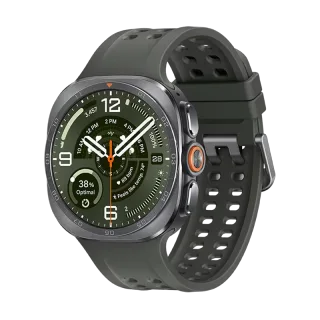
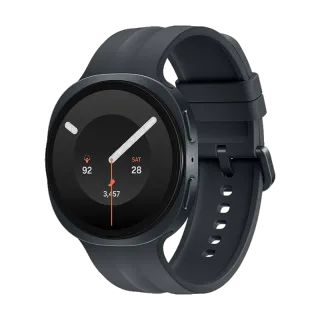
How to Connect Google Pixel Watch 4 to Your iPhone.
Yes. The Pixel Watch 4 works with iPhone. Google publishes no iOS app, so pair it with Lynio instead and you get calls, notifications, contacts and health sync in about 3 minutes. See how
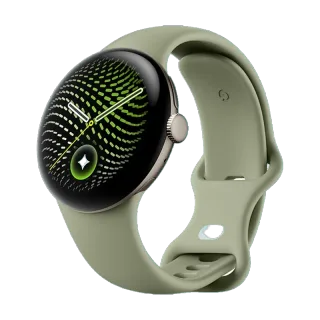
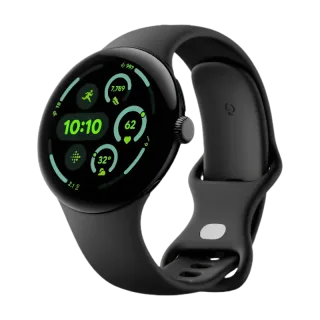
Google's fourth watch: the domed Actua 360 display at 3,000 nits, a Snapdragon W5 Gen 2, and the first Pixel Watch you can open and repair.
About the Google Pixel Watch 4
Released October 2025 from $349.99, and the first Pixel Watch Google designed to be opened. Two screws under the band pocket let you replace the battery or display without heat or adhesive, and it still holds 5ATM and IP68. Every earlier Pixel Watch was effectively disposable. The display is new too, a domed panel peaking at 3,000 nits with slimmer bezels, and charging moved to a side-mounted magnetic dock that needs at least 7.5W.
On LTE models, satellite SOS calls for help with no phone and no cell coverage, which Google claims as a smartwatch first. Google guarantees updates through October 2028, three years from its US on-sale date. That is a shorter window than Samsung offers, and worth knowing before you spend $499 on a 45mm LTE.
| 41mm | 45mm | |
|---|---|---|
| Case | 41mm recycled aluminium, 12.3mm thick | 45mm recycled aluminium, 12.3mm thick |
| Weight | 31.0g | 36.7g |
| Display | Actua 360 AMOLED LTPO, 320ppi, 3,000 nits, 1 to 60Hz | Same panel, 456 x 456 |
| Chip | Snapdragon W5 Gen 2 with a Cortex-M55 co-processor | Same |
| Memory | 2GB RAM, 32GB storage | Same |
| Battery | 325mAh, up to 30h with always-on | 455mAh, up to 40h with always-on |
| Charging | Side dock, 50% in 15 min, full in about 45 min | Full in about 60 min |
| Durability | 5ATM, IP68 | Same |
| Bluetooth | 6.0 | 6.0 |
| Other radios | Wi-Fi 6, NFC, ultra-wideband, dual-frequency GPS | Same |
| Satellite SOS | LTE models only | LTE models only |
| Updates until | October 2028 | October 2028 |
Connect in 3 Steps

Install Lynio Watch on your Google Pixel Watch 4
From the Play Store on the watch. If Google sign-in will not work there, Lynio sends the app across as a signed bundle over Wi-Fi instead.
Follow the in-app pairing guide
Keep both on the same Wi-Fi, Bluetooth on, and leave the app open until pairing finishes.
What You Get After Pairing
| Works | Does not carry over |
|---|---|
| Notifications from your iPhone | Google Wallet payments from the wrist |
| Calls, made and answered from the wrist | Gemini's phone-side features |
| Contacts synced from the iPhone | Fitbit's phone app and its coaching |
| Music playback control | Ultra-wideband phone unlock and car key |
| Workouts and health data written to Apple Health | Google Assistant routines |
| On-watch sensors, GPS, the repairable hardware |
Satellite SOS runs on the watch's own LTE rather than through your phone, so the capability stays on the device. Whether it is available to you depends on your carrier and country, and it is on LTE models only. Confirm it before buying for that reason.
Frequently Asked Questions
Once, and only if the watch is brand new. Google requires an Android phone running Android 11 or newer to activate it the first time. After that the Android phone plays no further part. A Galaxy Watch needs one at no point at all.
It is true of Google's own software. There is no Pixel Watch app on iOS and no setup path Google publishes. Lynio is a separate app that connects the watch without Google's companion app.
Ask the seller to leave it activated so you skip the Android step, and confirm whether it is the LTE model, since only that one has satellite SOS. Check the side charging dock is included, because older Pixel Watch chargers do not fit.
The on-watch part responds, but most of what makes it useful is access to what is on your phone, and that side is Android only.
References
- Google Store Pixel Watch 4 spec sheet: chip and co-processor, memory, display, batteries, charging, case, ratings, radios, sensors.
- Google Store, Pixel Watch Quick Charge Dock: magnetic pin to USB-C, 7.5W minimum.
- Google support, compatibility requirements: Android 11.0 or newer, iPhones are not supported.
- Google support, Pixel device update policy: Pixel Watch 4 through October 2028.
- 9to5Google, August 2025: repair process, two screws, no adhesive.
- Google blog and GSMArena: satellite SOS as a smartwatch first, dual-frequency GPS.