Optimized

Updated July 6, 2026

How to Connect Galaxy Watch Ultra 2 to Your iPhone.

Yes. The Galaxy Watch Ultra 2 works with iPhone. Pair it with the Lynio app and you get calls, notifications, contacts and health sync in about 3 minutes.

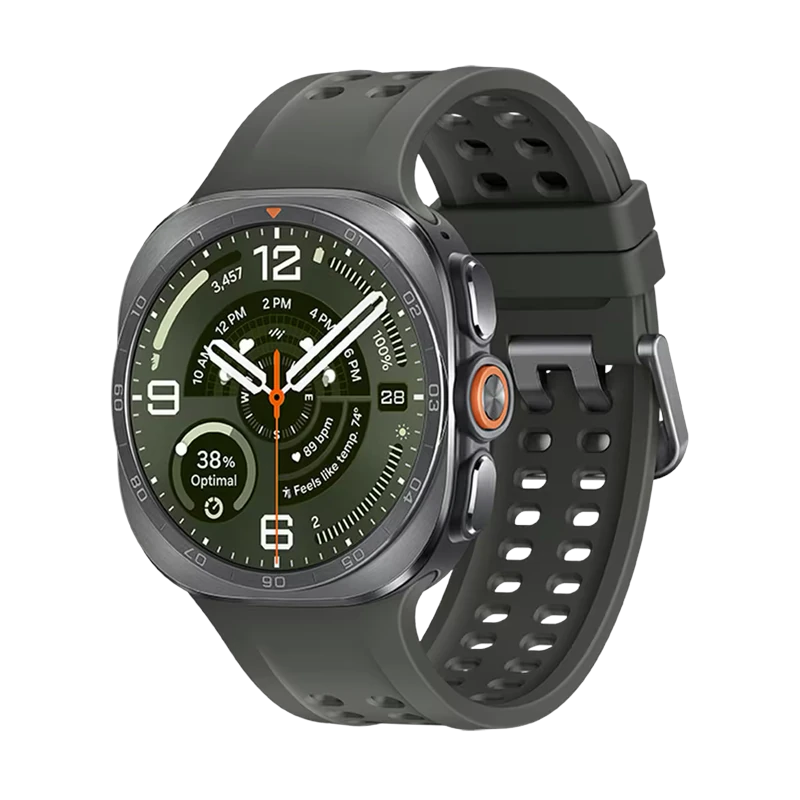
Samsung's 2026 flagship adventure watch: a titanium case 12% thinner than before, a 5,000-nit display, the Snapdragon Wear Elite chip and an 800mAh battery, plus IP69K and dive-rated MIL-STD-810H durability.

Galaxy Watch Ultra 2
Lynio

LYNIO

Wear OS

Google's watch platform

Bluetooth

Bluetooth

Wireless pairing

Google Play Store

Google Play Store

Install Lynio Watch

Titanium case, 5,000-nit display
Snapdragon Wear Elite, 800mAh battery
IP69K + dive-rated durability

About the Galaxy Watch Ultra 2

The Galaxy Watch Ultra 2 (2026) refines Samsung's toughest smartwatch: a titanium case that's 12% thinner than the original Ultra, a 1.52" display that hits 5,000 nits of peak brightness, and the new Snapdragon Wear Elite chip paired with an 800mAh battery, a 35% jump over the previous generation. IP69K and dive-rated MIL-STD-810H/EN13319 certification, plus automatic dive tracking, keep it built for the outdoors.

Officially, Samsung pairs the Watch Ultra 2 only with Android phones through the Galaxy Wearable app. There is no native iPhone support. Lynio closes that gap: install Lynio Watch from the Play Store on the watch, pair over Bluetooth, and your iPhone handles calls, notifications, contacts and health from then on. For first-time setup you may need brief access to an Android phone, and the in-app guide walks you through it.

The Watch Ultra 2 sits in Lynio's Optimized tier: call routing through the watch speaker, caller ID with your full iPhone address book, Apple Health sync and silent auto-reconnect are all tested specifically on this model.

Connect in 3 Steps

1
📱

Download Lynio on your iPhone

Free on the App Store. Search "Lynio" or tap the button below.

2

Install Lynio Watch on your Galaxy Watch Ultra 2

Open the Google Play Store on your Galaxy Watch Ultra 2, search "Lynio Watch" and tap Install. Your watch's Bluetooth will handle the rest.

3
🔗

Follow the in-app pairing guide

Open Lynio on your iPhone. It walks you through pairing step by step (takes about 2 minutes).

What You Get After Pairing

📞

Calls on your wrist

🔔

iPhone notifications

👤

Caller ID & contacts

❤️

Health → Apple Health

🎵

Music control

🔄

Auto reconnect

Frequently Asked Questions

Ready to connect your Galaxy watch?

See how it works · View all features

Keep Reading

Optimized

How to Connect Galaxy Watch 9 to Your iPhone

Samsung's 2026 mainline flagship: the first Galaxy Watch on the Snapdragon Wear Elite chip and Wear OS 7, with 2GB RAM, 32GB storage and 390mAh/445mAh batteries in 40mm and 44mm cases.

Read article →
Optimized

How to Connect Galaxy Watch Ultra to Your iPhone

Samsung's flagship adventure watch: a 47mm titanium case, sapphire crystal, 590mAh battery and the 3nm Exynos W1000, built to MIL-STD-810H with 10ATM water resistance.

Read article →
Optimized

How to Connect Galaxy Watch 8 Classic to Your iPhone

The 2025 Classic brings back Samsung's signature rotating bezel in a 46mm stainless steel cushion case, powered by the 3nm Exynos W1000 with a 445mAh battery.

Read article →